

rollingslotscasino welcome offer ca caters to mobile gamers in Canada. In other words, the core tasks (registration, cashier access, game discovery, and support) are built to work on a smartphone without the need for a PC. We assess the experience by practical stuff: loading speeds via cellular data, how plainly terms and limits are displayed, and whether account management tools stay available during gameplay. Before making a deposit, verify your eligibility, regional regulations, and payment options within the cashier. This guide explores how the casino is structured, what each area offers, and what to review before opening an account. We will point out the specifics that are most important for Canadian users.
Mobile-First Casino Experience for Canadian Players
We designed Rolling Slots for the mobile screen first. It’s not a shrunk-down desktop site. Menus, cashier steps, and game tiles are organized so you can jump from the lobby to a slot or table without squeezing and scrolling sideways. Account controls, deposit prompts, and support links are nearby during a session. Mobile interruptions occur often, so clear design beats fancy design. If you’re in Canada, here’s a quick test: open the homepage on your phone, see if the cashier and help pages load cleanly, and confirm your favourite games run smoothly before you put money in. A neat, fast-loading site on your specific device is what is important.
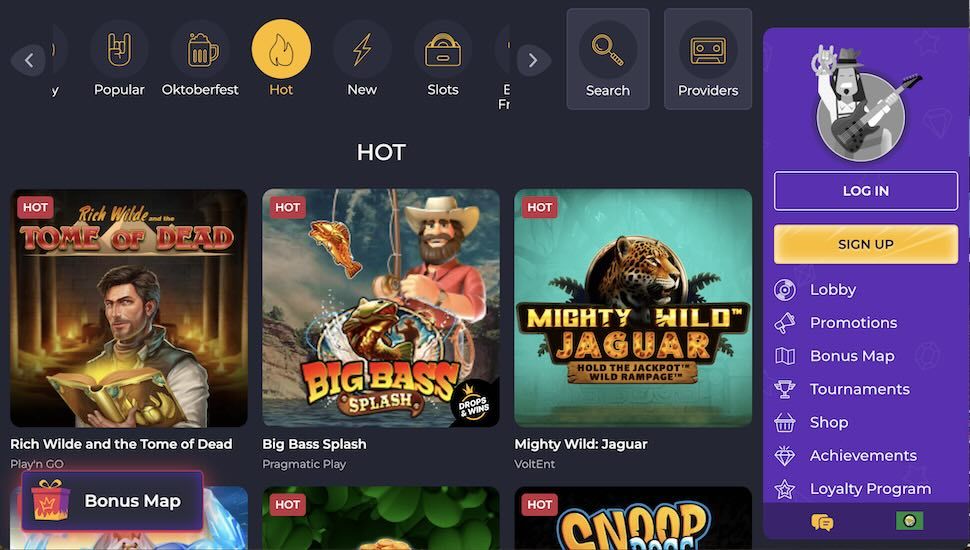
The mobile layout centers on three things you’ll do often: find a game, move money, and find help. Game categories sit up top, cashier links remain visible in your account area, and support options are positioned where you can reach them without leaving a game. That’s especially valuable in Canada, where players move between Wi‑Fi and mobile data all the time. A steady layout means you won’t lose your spot mid-deposit or mid-withdrawal. We don’t presume everyone wants the same path, so the homepage points to both quick-play shortcuts and fuller account pages. Before you register, confirm that your device, browser, and payment method are compatible in your province or territory. A simple compatibility check now prevents headaches later.
Promotions and Bonuses Built Around Mobile Play
We display promotions as part of your account journey, not as random banners. A bonus only helps if you can read the terms and claim it on your phone without getting lost. Typical offers feature a welcome package, deposit match, free spins, or reload deals. Each has its own wagering requirements, eligible games, and expiry dates. We won’t list fixed numbers here because offers change and depend on your location and account status. We attempt to put the key numbers (wagering, game weights, expiry) right where you can see them before you click accept. The smart move: open the terms before you opt in. Check the minimum deposit, max bet rules, and whether mobile play counts fully toward wagering.
Terms and Mobile Claiming
Bonus claiming is built for phone screens. Key conditions appear before you accept, and you can see your active offers in your account area. That’s important because a promo can look great on the homepage but have game-weighting rules that make some slots count for little or nothing toward wagering. If the terms exclude the games you actually want to play, the offer might not be worth it. Canadian players should also check if the bonus is available in their province, if a promo code is needed, and if certain payment methods are excluded. If a term doesn’t make sense, ask support before you deposit, not after you start wagering. We’d rather show clear, checkable conditions than big promises. Clarity protects you and the casino’s reputation over time.
Game Selection Across Slots, Tables, and Live Casino
Slots represent the largest chunk of the lobby. We group them so you can contrast themes, volatility, and features excluding opening every game. You’ll spot classic reels, video slots, and feature-packed titles, with filters or category tags to minimize search time. We will not quote a set number of games as the library evolves as providers enter and exit. Instead, look for current titles, clear provider info, and demo modes when available. If a game offers a demo mode, use it to test the mechanics prior to you invest real money. Canadian players should also check game rules and RTP figures ahead of betting real money. Two slots with similar artwork can behave completely differently regarding volatility and the rate at which they hit.
Table Games and Live Dealer Selections
Table games and live dealer options cater to players who favor rules-based play instead of spinning reels. You’ll find blackjack, roulette, baccarat, and poker variants in the lobby, while live dealer tables deliver real games to your mobile browser. The primary difference: table games benefit knowing the rules and limits, while live casino relies more on stream quality and table availability. Virtual tables usually run quicker, while live games introduce a human dealer and real-time interaction. On a phone, confirm that the table view fits your screen, bet controls are easy to tap, and the video stays stable on your connection. Review the table limits ahead of you sit down. Minimum and maximum bets may differ a lot between virtual and live versions.
Payments, Payments, and Cashouts for Accounts in Canada
The payment hub shows your payment options after you sign in. Options depend on your nation, region, currency, and account standing. Players in Canada frequently rely on Interac, debit or credit cards, e-wallets, and bank transfers. Interac is widely used in Canada because it links directly to your bank account and processes quickly. But never assume a method is accessible until you see it in your account. Funding usually process faster than withdrawals. E-wallet payouts usually process sooner than bank transfers, though specific timelines depend on the provider and verification. Before you deposit, verify the minimum and maximum caps, any charges, currency conversion rules, and whether the method works for both deposits and withdrawals. The cashier must outline all this out before you confirm a transaction.
Verification for Cashouts and Timing

Cashouts generally require identity and payment-method verification. That step carries more weight than the published timeline. Submit your paperwork before you ask for a withdrawal. Standard paperwork include a photo ID, proof of address, and proof of payment method ownership. Incomplete documents can delay a withdrawal even if the payment provider is ready. After approval, pace varies by the method: e-wallets are usually quicker, card and bank transfers at a reduced pace, and some providers have their own clearing periods. Canadian players should check if withdrawal restrictions apply per transaction or per week, if charges are applied, and if the casino refunds to the original payment type you used to deposit. Keep records of your submissions and check the cashier status page instead of speculating when the money will arrive.
Device Compatibility, Mobile App Availability, and Speed Expectations
Device compatibility is a basic requirement, not a feature. Our mobile website adjusts to your display size and platform. The casino works in your device browser, so there’s no app to download. That’s convenient for Canadians who alternate between iOS and Android or use a tablet. We evaluate on a variety of phones, from middle-tier to flagship models, and pages are expected to load in a matter of seconds on a stable 4G connection. We check on a mix of iOS and Android devices, covering older devices that many people still use. Before making a deposit, try a few games and the banking section on your device. Verify that buttons are big enough to tap, text is readable, and transitions feel quick. A smooth first session typically indicates the technology base is strong for longer play.
Steady performance counts because mobile networks in Canada are quite different between cities and rural areas. We compress assets so games don’t consume too much data. For long live dealer sessions or big software updates (if offered), connect via Wi‑Fi. If you’re in a rural area with spotty mobile coverage, downloading games over Wi‑Fi can be very beneficial. Since there’s no native app, you avoid storage and update hassles, but you rely on your browser’s ability to handle WebGL and streaming. Keep your browser updated and clear the cache if things slow down. Our support team can offer you a list of recommended browsers and minimum OS versions. If a free-play mode is available, test it initially to check stability without risking real cash.
Application-Style Experience Without a Download
We don’t have a specialized app, but you can nevertheless achieve an app-like feel. On the majority of devices, you can put a shortcut to your home screen. The procedure functions on both iOS and Android, though the specific steps differ by device. That shortcut starts the casino in a tidy browser window missing the address bar, providing you a full-screen view that feels like a native app. We don’t push notifications for offers or account updates through this method, so you’ll still have to visit the site or your email for time-sensitive offers. The benefit for Canadian players: you maintain full command over storage and permissions while receiving a focused, clutter-free layout. It’s a functional middle ground, lightweight, safe, and one tap from your home screen.
We also consider how the site handles interruptions like phone calls or network switches. Your session should continue from where it stopped. Any transaction in progress should either complete or time out clearly, without leaving your balance in a questionable state. We mimic these interruptions during testing to make sure the platform recovers without glitches. This is essential for live dealer games, where a dropped connection can disrupt a hand or spin. We evaluate these scenarios often and require the platform to manage them without issues. If you keep getting disconnected, check your signal strength, close background apps, and switch to a stable Wi‑Fi connection. The objective is a mobile casino that feels trustworthy, so you can enjoy the games instead of troubleshooting.
Licence Requirements, Security, and Safe Gambling Controls
Rolling Slots Casino functions under the licence framework for the markets it serves. The authority, licence number, and company details should be in the site footer or legal pages. A legitimate licence indicates the casino follows rules on game fairness, fund segregation, and dispute resolution. Canadian players ought to check those details before signing up, since online gambling rules change by province and territory. For security, we employ encrypted connections, secure login procedures, and identity checks to safeguard your account and payment methods. Use a unique password, turn on two-factor authentication if it’s available, and avoid public Wi‑Fi when you’re in the cashier. A licence doesn’t guarantee a perfect experience, but it offers you a formal complaints channel and demonstrates the operator answers to a regulator.
Responsible Play Tools
Player protection tools are part of the product, not added later. Mobile access makes them easy to reach when you need them. Your account settings must contain deposit limits, loss limits, session reminders, time-outs, and self-exclusion. Each control features a clear explanation of how it works and when it activates. Establish limits before you start playing, not after a bad session. You can adjust these limits as your habits change, but keep in mind that loosening restrictions often is slower than tightening them. Check the rules on changing limits: reductions usually apply right away, but increases might have a cooling-off period. If gambling stops feeling like a choice, get in touch with support or use self-exclusion. You can also get help from a recognised problem-gambling service in your province.
FAQ
Am I able to play at Rolling Slots Casino on my iPhone or Android device without installing an app?
Yes. The casino operates completely in your mobile browser, without an app. The site adjusts to iOS and Android screens, and you can add a home screen shortcut for speedy, full-screen access. The mobile site is made to be lightweight, so it loads swiftly even on slower connections. That saves storage and skips update prompts. You’ll need a modern browser and a steady internet connection. Test a few games on your device before depositing to make sure performance feels right.
Is Rolling Slots Casino properly licensed for Canadian players?
Rolling Slots Casino has a recognised international gaming licence. The details are in the site footer. If you don’t see the licence details, get in touch with support and ask for the exact information. Canadian players should check that licence before signing up, since online gambling rules differ by province and territory. The casino allows Canadian accounts, but it’s up to you to verify that online play is legal where you live. The licence provides you a formal complaints channel and demonstrates the operator follows standards for fairness and security.
Which payment methods can I use on mobile for deposits and withdrawals?
How do I claim a welcome bonus or promotion via mobile?
Once you log in, the cashier shows the methods accessible for your account. Standard options include Interac, credit and debit cards, e-wallets, and bank transfers. A few methods might be available only for deposits, not withdrawals, so verify that before you deposit into your account. The options available depend on your province, currency, and verification status. Deposits generally process rapidly. Withdrawal times vary by method. Make sure to check the minimum and maximum limits, any fees, and whether a method works for deposits and withdrawals alike prior to committing.
How do I claim a welcome bonus or promotion on my phone?
Bonuses display in your account area and on the promos page. You may read the terms and opt in right from your mobile browser. Essential terms (wagering requirements, eligible games, expiry dates) are shown before you accept. Should you change your mind after opting in, you can frequently cancel the bonus before you start wagering, but verify the terms. check the details Verify if the bonus is available in your province and if you need promo code. If something is confusing, contact support before you deposit to avoid confusion later.
Can live dealer games fully functional on a mobile device?
Live dealer tables stream to your mobile browser with an interface built for touch. Stream quality depends on your connection, so a solid Wi‑Fi or strong mobile data signal helps. You can usually preview the table and see the dealer before you take a seat. Before you join a table, check that the bet controls fit your screen and the video stays smooth. Table limits can differ from virtual games, so look at the min and max bets in the lobby to make sure they fit your budget.
Which responsible gaming tools can I access from my phone?
Your account settings have deposit limits, loss limits, session reminders, time-outs, and self-exclusion. All are reachable from the mobile menu. You can set daily, weekly, or monthly deposit limits, and the system enforces them automatically. Set them before you play. Reductions usually kick in right away; increases might have a cooling-off period. Use these tools proactively. If play stops feeling under control, contact support or a local problem-gambling service.
How long do withdrawals take, and what verification is needed?
Withdrawal times depend on your payment option and how fast you finish identity and payment verification. Verification is normally a one-time step; once you’re approved, future cashouts move quicker. E-wallet payouts often go through within a day or two after approval. Card and bank transfers can take several business days. Upload your documents before requesting a cashout to skip delays. Check the cashier for per-transaction or weekly limits, and see if funds go back to the same method you used to deposit.